
Waves System Microplayer:
How to Sequence Playback

One of the useful features of the Waves System Microplayer is its ability to play single files in a sequenced order from a contact input. In this technical guide we show how to organise the file structure on the SD/USB card.
Setting up the File Folder for Sequenced Playback
In the example shown below, using the [SEQ] command in the folder name, we can get the MicroPlayer to play the files inside this folder in sequenced order. In this example we also use the [NXT001] command which tells the player to play only one audio file then stop. This command can be changed to however many files you wished to be played with one contact input, for example [NXT003]
We also use the [NT] command, which tells the MicroPlayer to not restart the playback from any additional contact input, so this avoids contact bounce and accidental activation.

To enable the player to provide sequenced playback, the audio files within the folder need to be renamed starting with a three digit number. This tells the player in which order to play the files:
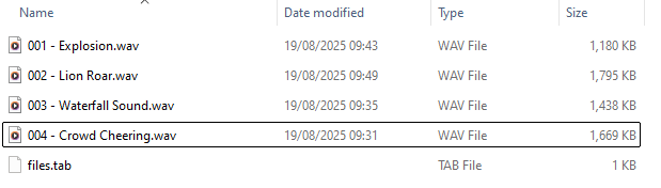
The files.tab is automatically created by the player to keep a record of which files it has already played.
Click here to find out more about the Waves System MicroPlayer.
Click here to see the whole Waves System Range of audio and video players.
We hope this has been helpful. If you need any further advice, please give us a call on 01663 767888 and we'll be pleased to help.